
315 lines
No EOL
15 KiB
Markdown
315 lines
No EOL
15 KiB
Markdown
# PyQt6 Scaffold
|
|
A wrapper for PyQt6 designed for a more convenient workflow.
|
|
|
|
[Русскоязычная Документация](docs/README.ru.md)
|
|
|
|
## License
|
|
|
|
This project is licensed under the LGPLv3 license.
|
|
See the LICENSE file for details.
|
|
|
|
# Description
|
|
This library provides a set of ready-to-use patterns and tools that can be immediately integrated into development to avoid common pitfalls in complex areas (such as database management or window navigation).
|
|
|
|
The library is divided into two main modules:
|
|
- Core
|
|
- Contrib
|
|
|
|
## Installation
|
|
|
|
Base installation (core only):
|
|
```bash
|
|
pip install pyqt6-scaffold
|
|
```
|
|
|
|
With MySQL support:
|
|
```bash
|
|
pip install pyqt6-scaffold[mysql]
|
|
```
|
|
|
|
With PostgreSQL support:
|
|
```bash
|
|
pip install pyqt6-scaffold[postgres]
|
|
```
|
|
|
|
All drivers at once:
|
|
```bash
|
|
pip install pyqt6-scaffold[all]
|
|
```
|
|
|
|
## Quick Start
|
|
|
|
### 1. Configure Environment Variables
|
|
Create a start.sh (Linux/macOS) or start.cmd (Windows) file:
|
|
|
|
```bash
|
|
# start.sh
|
|
export MYSQL_HOST=localhost
|
|
export MYSQL_PORT=3306
|
|
export MYSQL_USER=root
|
|
export MYSQL_DATABASE=mydb
|
|
export MYSQL_PASSWORD=secret
|
|
python main.py
|
|
```
|
|
|
|
```powershell
|
|
:: start.cmd
|
|
set MYSQL_HOST=localhost
|
|
set MYSQL_PORT=3306
|
|
set MYSQL_USER=root
|
|
set MYSQL_DATABASE=mydb
|
|
set MYSQL_PASSWORD=secret
|
|
python main.py
|
|
```
|
|
|
|
### 2. Implement the Database
|
|
```python
|
|
from pyqt6_scaffold import BaseUser
|
|
from pyqt6_scaffold.contrib import MysqlDatabase
|
|
|
|
class AppDatabase(MysqlDatabase):
|
|
def auth(self, login: str, password: str):
|
|
with self.execute(
|
|
f"SELECT id, name FROM users WHERE login = {self.placeholder} AND password = {self.placeholder}",
|
|
(login, password)
|
|
) as cursor:
|
|
row = cursor.fetchone()
|
|
if not row:
|
|
return None
|
|
return BaseUser(id=row[0], name=row[1], role=None)
|
|
```
|
|
|
|
### 3. Create Windows
|
|
```python
|
|
from pyqt6_scaffold import BaseWindow
|
|
from PyQt6.QtWidgets import QLabel, QLineEdit, QPushButton, QVBoxLayout, QWidget
|
|
|
|
class LoginWindow(BaseWindow):
|
|
def _define_widgets(self):
|
|
self._login_input = QLineEdit()
|
|
self._password_input = QLineEdit()
|
|
self._password_input.setEchoMode(QLineEdit.EchoMode.Password)
|
|
self._submit_btn = QPushButton("Login")
|
|
|
|
def _tune_layouts(self):
|
|
layout = QVBoxLayout()
|
|
layout.addWidget(QLabel("Login:"))
|
|
layout.addWidget(self._login_input)
|
|
layout.addWidget(QLabel("Password:"))
|
|
layout.addWidget(self._password_input)
|
|
layout.addWidget(self._submit_btn)
|
|
container = QWidget()
|
|
container.setLayout(layout)
|
|
self.setCentralWidget(container)
|
|
|
|
def _connect_slots(self):
|
|
self._submit_btn.clicked.connect(self._on_submit)
|
|
|
|
def _apply_windows_settings(self):
|
|
self.setWindowTitle("Login")
|
|
|
|
def _on_submit(self):
|
|
user = self._db.auth(
|
|
self._login_input.text(),
|
|
self._password_input.text()
|
|
)
|
|
if user is None:
|
|
return
|
|
from pyqt6_scaffold import NavigateRequest, NavigationContext
|
|
self._composer.navigate_request.emit(
|
|
NavigateRequest(
|
|
target="main",
|
|
context=NavigationContext(data={"user": user})
|
|
)
|
|
)
|
|
|
|
class MainWindow(BaseWindow):
|
|
def _apply_windows_settings(self):
|
|
self.setWindowTitle("Main Window")
|
|
```
|
|
|
|
### 4. Assemble the Application in main.py
|
|
```python
|
|
import sys
|
|
from PyQt6.QtWidgets import QApplication
|
|
from pyqt6_scaffold import Composer
|
|
|
|
def main():
|
|
app = QApplication(sys.argv)
|
|
|
|
db = AppDatabase()
|
|
db.connect()
|
|
|
|
composer = Composer(app=app, db=db)
|
|
composer.register("login", LoginWindow)
|
|
composer.register("main", MainWindow)
|
|
|
|
sys.exit(composer.run(start="login"))
|
|
|
|
if __name__ == "__main__":
|
|
main()
|
|
```
|
|
|
|
## Core Module
|
|
The module providing essential tools for development, usually in the form of abstract classes that implement a convenient pattern. For example, the BaseWindow class implements a minimally acceptable (in the author's opinion) pattern for an application window:
|
|
```python
|
|
from PyQt6.QtWidgets import QMainWindow
|
|
|
|
class BaseWindow(QMainWindow):
|
|
def __init__(self, composer, db):
|
|
super().__init__()
|
|
self._db = db
|
|
self._composer = composer
|
|
|
|
self._define_widgets()
|
|
self._tune_layouts()
|
|
self._connect_slots()
|
|
self._apply_windows_settings()
|
|
|
|
def _define_widgets(self): pass
|
|
def _tune_layouts(self): pass
|
|
def _connect_slots(self): pass
|
|
def _apply_windows_settings(self): pass
|
|
```
|
|
|
|
The main components of the Core module are the navigation and database interaction classes.
|
|
|
|
### Database
|
|
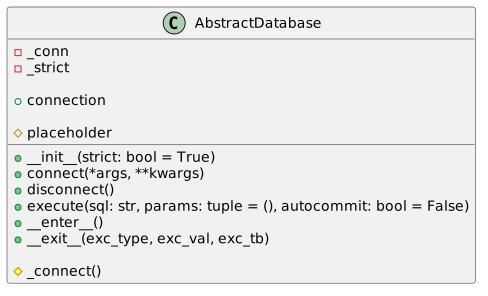
The `AbstractDatabase` class is responsible for database management within the library.
|
|
The class structure looks approximately like this:
|
|
|
|
|
|
|
|
This is an abstract class that must be overridden in a subclass. Let's break it down in detail:
|
|
- **Class Constructor**:
|
|
- Contains a single argument: **strict**. This affects how the system reacts when a user opens a new connection, as the default assumption is that the user will use only one connection for database interaction. If **strict** = True and the class already holds a reference to an existing connection (_conn != None), the execution will fail with an error. If **strict** = False, the old connection will be closed and the class will create a new connection to the database.
|
|
- **connect()**: A context-independent method for creating a database connection. Internally, it calls the private method `_connect()`, which is context-dependent on the SQL dialect and must be overridden by the user in the subclass.
|
|
- In the `_connect()` method, the user implements the specific database connection logic for their chosen SQL dialect. The method should return a connection object, typically resembling: `your_sql_dialect_connection.connect(**DB_CONFIG)`
|
|
- **disconnect()**: A context-independent method for manually closing the database connection.
|
|
- **connection**: A getter for the `_conn` field, returning the current database connection.
|
|
- **execute()**: A context-independent method for executing database code. It handles opening a connection cursor and executing the user's query. It consists of several components:
|
|
- **CursorContext**: A context-independent wrapper class for the cursor object. It is required for compatibility and using the cursor within a context manager, proxying all cursor methods to make it programmatically equivalent to a cursor object.
|
|
- **placeholder**: A context-dependent getter for the SQL dialect's specific placeholder used for value substitution; must be overridden by the user.
|
|
- **Method Arguments**: `execute()` takes only 2 arguments: `autocommit (bool)` and `params (tuple)`. The first regulates database behavior during data changes—whether to apply them immediately or require the user to do so manually. The second argument passes the values for substitution.
|
|
- If query execution fails, the method will automatically roll back any changes in the database.
|
|
|
|
#### Database Models
|
|
As is common knowledge, interaction between the database and the frontend in PyQt6 is implemented through a system of models and views. This library redefines models for tables, lists, and cards, implementing a compatible interface for the database management logic described above.
|
|
|
|
The model logic in the library is represented by three model classes and one auxiliary mixin class:
|
|
- **DataMixin** A mixin for Qt models (`QAbstractTableModel` / `QAbstractListModel`). It contains shared logic for data storage, model updates, and row styling. `DataMixin` is used alongside Qt models and is not intended for standalone use. It simplifies the implementation of common model functions so that specific classes can focus on business logic.
|
|
Provides methods for:
|
|
- data storage (`_data`)
|
|
- model reloading (`refresh`)
|
|
- row access (`row_data`)
|
|
- styling (`row_background`, `row_foreground`, `row_font`)
|
|
- **BaseTableModel** A table model based on a list of row tuples. It supports displaying data in a table with column headers, access to raw data, and cell styling via mixin methods. Intended for scenarios where data is naturally represented as a table (e.g., lists of objects with fixed fields).
|
|
- **BaseListModel** A list model where each entry is represented as a list item. Text display is handled via the `row_display()` method. Suitable for simple lists, comboboxes, and other views where a table structure is not required.
|
|
- **BaseCardModel** A model for card-based or custom-drawn views.
|
|
Does not implement `DisplayRole`—visualization is delegated to a `QStyledItemDelegate`. This allows for building complex UI components (cards, tiles, custom lists) while maintaining data access via `UserRole`.
|
|
|
|
### Composer
|
|
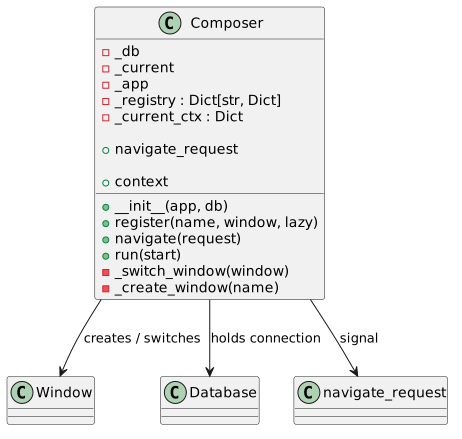
The Composer class is the application's router and window lifecycle manager. It is responsible for window registration, navigation between them, and storing the active database connection. The Composer acts as the application's central hub, through which view switching and context passing occur.
|
|
|
|
|
|
|
|
Let's examine its structure:
|
|
- **Class Constructor**:
|
|
- Contains 2 arguments: **app** and **db**. **app** is a reference to the PyQt6 event loop object, and **db** is a reference to the database object.
|
|
- Internally initializes 5 fields:
|
|
- **_db**: Stores a reference to the database object.
|
|
- **_current**: Stores a reference to the active window.
|
|
- **_app**: Stores a reference to the PyQt6 event loop object.
|
|
- **_registry**: Stores a reference to the composer's registry, which is a "key-value" store (Python dict) containing mappings between a string name and a window class reference.
|
|
- The entry template in the composer registry is defined in the `register()` method and looks like this:
|
|
```python
|
|
{
|
|
"class": window,
|
|
"instance": None,
|
|
"lazy": lazy
|
|
}
|
|
```
|
|
- The **class** field is a reference to the window class.
|
|
- The **instance** field is a reference to the window object (if created).
|
|
- The **lazy** field is a setting for window object creation. If `lazy = True`, the window object is created at the moment of the switch request. If `lazy = False`, the object is created immediately during registration. The former is better if the window content is context-dependent.
|
|
- **_current_ctx**: Stores the context of the active window as a "key-value" store. The context is unique to each window and is overwritten when switching. It can contain any key-value pairs used for window needs (e.g., if using RBAC, it is logical to store a user rights object here). The context is set during the `Maps()` slot call. It is assumed the starting window should not contain a context.
|
|
- **register()**: A method for creating a new entry in the composer registry. If the class passed in the `window` argument is not a subclass of `BaseWindow`, a Python exception will be raised.
|
|
- **navigate_request**: The composer's only signal. It should be emitted when the user needs to switch windows, passing a reference to the `NavigationRequest` dataclass.
|
|
- **navigate()**: The method managing window switching. It is a PyQt6 slot and should not be called directly, as it is triggered automatically by the `Maps_request` signal.
|
|
- **NavigationRequest** is a dataclass consisting of `target: str` and `context: NavigationContext` fields. It carries the switch request context, which consists of the target window name and the window class reference. In turn, the **NavigationContext** dataclass consists of a single `data` field which stores the window context.
|
|
|
|
Switching between windows is performed via the Composer class's programmatic interface, a reference to which all windows should receive by default (see Window Template above).
|
|
|
|
## Contrib Module
|
|
|
|
The `contrib` module contains ready-to-use implementations for common use cases. Unlike `core`, `contrib` is context-dependent and provides specific solutions that a user can use as-is or as a foundation.
|
|
|
|
### Backends
|
|
|
|
Ready-made implementations of `AbstractDatabase` for three SQL dialects:
|
|
```python
|
|
from pyqt6_scaffold.contrib import PostgresqlDatabase, MysqlDatabase, SqliteDatabase
|
|
```
|
|
|
|
Each backend reads configuration from environment variables:
|
|
|
|
| Class | Environment Variables |
|
|
|--------------------|--------------------------------------------------------------------|
|
|
| PostgresqlDatabase | PG_HOST, PG_PORT, PG_USER, PG_DATABASE, PG_PASSWORD |
|
|
| MysqlDatabase | MYSQL_HOST, MYSQL_PORT, MYSQL_USER, MYSQL_DATABASE, MYSQL_PASSWORD |
|
|
| SqliteDatabase | SQLITE_PATH |
|
|
|
|
### Auth
|
|
Authorization system based on RBAC (Role-Based Access Control):
|
|
|
|
```python
|
|
from pyqt6_scaffold.contrib.auth import RBACMixin, Role, RoleLevel
|
|
```
|
|
|
|
**Role** and **RoleLevel** — a dataclass and an enum for describing user roles:
|
|
|
|
```python
|
|
from pyqt6_scaffold.contrib.auth import Role, RoleLevel
|
|
from pyqt6_scaffold import BaseUser
|
|
|
|
role = Role(name="Manager", level=RoleLevel.MANAGER.value)
|
|
user = BaseUser(id=1, name="Ivan", role=role)
|
|
```
|
|
|
|
**RBACMixin** — a mixin that adds the `can()` method to your database.
|
|
It assumes the existence of a `permission_map` table in the database:
|
|
|
|
```sql
|
|
CREATE TABLE permission_map (
|
|
perm VARCHAR(50),
|
|
min_level INT
|
|
);
|
|
|
|
INSERT INTO permission_map VALUES ('edit.products', 50);
|
|
INSERT INTO permission_map VALUES ('delete.products', 100);
|
|
INSERT INTO permission_map VALUES ('view.products', 0);
|
|
...
|
|
```
|
|
|
|
Usage:
|
|
```python
|
|
from pyqt6_scaffold.contrib import MysqlDatabase
|
|
from pyqt6_scaffold.contrib.auth import RBACMixin
|
|
|
|
class AppDatabase(RBACMixin, MysqlDatabase):
|
|
def auth(self, login, password): ...
|
|
|
|
db = AppDatabase()
|
|
db.connect()
|
|
|
|
db.can(user, "edit.products") # True if user.role.level >= 50
|
|
db.can(user, "delete.products") # False if user.role.level < 100
|
|
```
|
|
|
|
Table and column names can be overridden:
|
|
```python
|
|
class AppDatabase(RBACMixin, MysqlDatabase):
|
|
permission_table = "rights"
|
|
permission_column = "action"
|
|
level_column = "required_level"
|
|
``` |